Network
Build a segmented home network with a real firewall in front of it, so lab experiments stay isolated from my trusted devices and my DNS traffic is private.
Design
Section titled “Design”| Network | VLAN | Subnet | Purpose |
|---|---|---|---|
| LAN | untagged | 192.168.1.0/24 |
Trusted clients and management |
| Lab | 10 | 192.168.10.0/24 |
GNS3, lab VMs, auxiliary services |
Notable hosts:
| Host | Network | Role |
|---|---|---|
| OPNsense | Both | Gateway / firewall |
| Proxmox VE | Lab | Hypervisor for lab VMs |
| Storage host | Lab | SMB file shares |
Internet | [ OPNsense ] / \ LAN Lab (VLAN 10) 192.168.1.0/24 192.168.10.0/24Firewall
Section titled “Firewall”The policy in one line: the LAN can start connections into the Lab, but the Lab can’t start connections into the LAN.
OPNsense is a stateful firewall, so rules only apply to whoever starts a connection. When I SSH from my PC into a lab VM, the replies come back automatically. When a lab VM tries to open a connection to my PC, it’s dropped.
Lab rules
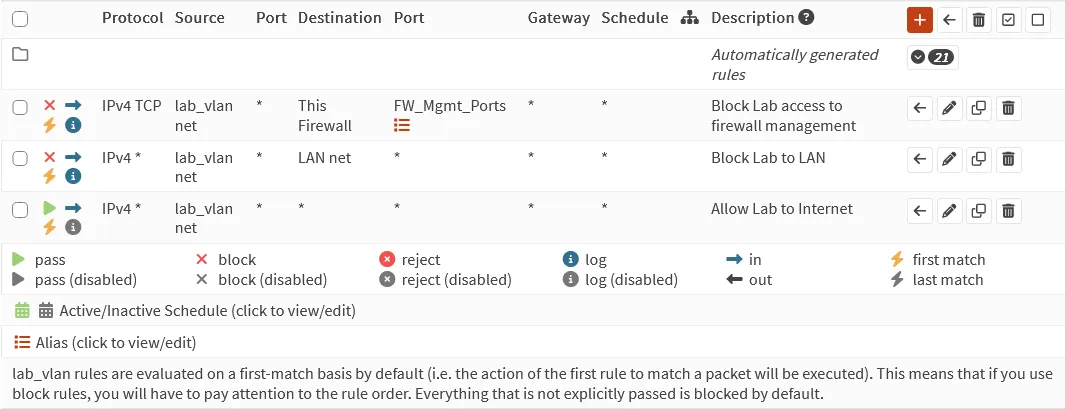
Section titled “Lab rules”Evaluated top-down, first match wins:
| # | Action | Source | Destination | Ports | Why |
|---|---|---|---|---|---|
| 1 | Block | Lab net | This Firewall | 22, 80, 443 | Lab can’t reach the firewall’s SSH or web GUI on any of its addresses |
| 2 | Block | Lab net | LAN net | any | Lab can’t reach trusted devices |
| 3 | Pass | Lab net | any | any | Everything else: internet, plus DNS/DHCP/NTP from the Lab gateway |
Ports 22, 80 and 443 live in a port alias (FW_Mgmt_Ports) so the rule
stays readable. Rule 1 comes from
patching OPNsense for PHP2Shell.
Verify the isolation
Section titled “Verify the isolation”Tested from a Kali VM on the Lab network, before and after adding rule 2:
| Test from Kali (Lab) | Before | After |
|---|---|---|
ping 192.168.1.1 (firewall’s LAN address) |
Replies | 100% loss |
nslookup example.com 192.168.1.1 |
Resolves | Timed out |
ping 192.168.10.1 (Lab gateway) |
Replies | Replies |
nslookup example.com (via Lab gateway) |
Resolves | Resolves |
The two tests that should fail now fail, and the two that should keep working still work: the Lab lost access to the LAN, not to its own gateway. I ran all of this over an SSH session from my PC into Kali, and that session stayed up the whole time, which shows LAN → Lab still works.
Encrypted DNS (DNS-over-TLS)
Section titled “Encrypted DNS (DNS-over-TLS)”Why: normal DNS (port 53) is plaintext, so my ISP or anyone on the path can see, log, or tamper with every domain I look up. DNS-over-TLS wraps those queries in TLS on port 853.
In OPNsense (menu names may vary slightly by version):
-
Services → Unbound DNS → General: enable Unbound and Enable DNSSEC Support.
-
Services → Unbound DNS → DNS over TLS: add Cloudflare upstreams:
Server Port Verify CN 1.1.1.1853 cloudflare-dns.com1.0.0.1853 cloudflare-dns.com -
TODO: anything else I changed (e.g. System → Settings → General DNS servers, “allow DNS override” unchecked).
Verify
Section titled “Verify”-
Visit https://1.1.1.1/help. It should show Using DNS over TLS (DoT): Yes.
-
From a LAN client:
Terminal window nslookup example.com # server should be the OPNsense IP
Lessons
Section titled “Lessons”My documentation said the Lab was isolated, and it wasn’t
Section titled “My documentation said the Lab was isolated, and it wasn’t”This page originally said the Lab was blocked from the LAN. When I actually tested from Kali, it could reach everything. The Lab interface had a pass-everything rule that looked like a copy of the LAN’s default rule, and nothing above it to block the LAN.
Two things fixed it: a block rule, and a test from the untrusted side. The second one matters more. A firewall policy isn’t real until you’ve tried to break it from the network it’s supposed to contain.
Next steps
Section titled “Next steps”- Block outbound port 53 from clients so devices can’t bypass Unbound
- Move hypervisor management to its own network, separate from lab VMs